Showing posts with label on. Show all posts
Showing posts with label on. Show all posts
Thursday, June 13, 2013
Install 24pin and 8pin cables on Pro Series Gold PSU
Install 24pin and 8pin cables on Pro Series Gold PSU
This tutorial shows the proper way to install 24pin and 8pin cables on the Professional Series Gold PSUs.
When it comes to excellent performance, quality, reliability, and energy-efficiency, Corsair power supply units (PSUs) are the solution. With a new standard, Corsair Professional Series™ Gold power supplies are completely modular, one of the best features of the AX series.
In this tutorial, you will be shown how to install and connect the 24pins and 8pins cables available on the following Corsair Professional Series Gold PSUs: AX750, AX850 and AX1200.
Install 24pin and 8pin cables on Pro Series Gold PSU #1
What comes with the AX Series PSU
First, be sure that you have the following along with your power supply (the amount of cables varies with the model of your PSU):
1. Corsair AX PSU with protective pouch
2. Cables with carrying bag (amount of cables varies on which model purchased)
3. Users manual
4. Power cable
5. Tie straps/screws to mount PSU to case/case badge

Install 24pin and 8pin cables on Pro Series Gold PSU #2
Understand the connectors
The picture below shows the basic design for the AX750/AX850 and AX1200 PSUs. Understand what each group indicated is:
1. Boxed in yellow: 24 Pin connector (both connectors will need to be plugged)
2. Boxed in blue: Peripherals and SATA cables
3. Boxed in Green: EPS connector and PCI E connector
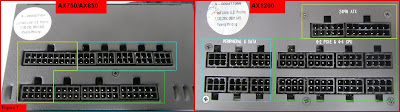
Install 24pin and 8pin cables on Pro Series Gold PSU #3
24pin cables connections
As you can see in the below picture, all the cables are labeled to clearly indicate with which power supply they can be used. The correct way to plug the cables is also indicated. Some cables are labeled to specific models only.
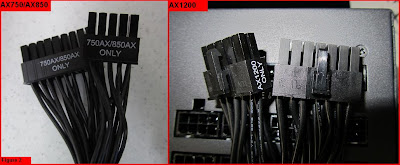
The power supplies are normally designed to have 20-24 pin connectors, depending on the requirements of the motherboard. So, if you require only 20 pins, leave the remaining 4 pins (2x2) hanging to the side, and do not try to use these for the EPS 12v connection.
Install 24pin and 8pin cables on Pro Series Gold PSU #4
8/4 pin and PCI-E connectors
The power supplies come with different EPS 12v 8/4 pin connectors. If you take a look at the AX1200 model, you will see that they come in a form factor of 8 pins (2x4), and are labeled as “4-4 CPU”. The AX750 and AX850 are slightly different, and come in two different layouts; an 8 pin and two 12 pin plugs. The 8 pin plug is designed only for the EPS 12v connector while the other two 12 pins are used for the PCI-E connectors.
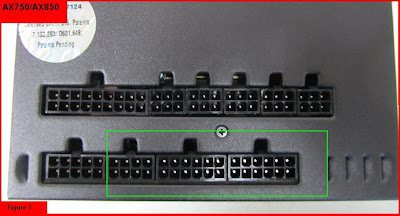
After correctly installing the cables to the power supply unit, plug the other end into the socket of the motherboard. The EPS 12v connector will either require an 8 pin or 4 pin connections, depending on the motherboard. But that`s not a problem as the Corsair power supplies come with both. Connecting the two 4 pins would give you an 8 pin connector if your motherboard requires it, if not; you can use the 4 pin connectors.
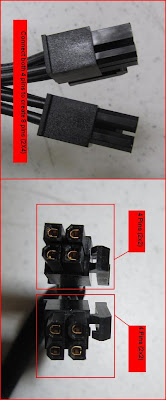
Now, once completed, be sure to check everything again to ensure you have done nothing wrong. Then, you can start and enjoy your system.
This tutorial was originally made by Carlos Pascual on the 18th May 2011 at Corsair. All credits go to them. Also, I would like to thanks these guys there (unfortunately, I had problem commenting there) for the excellent tutorials they provide us. They are among the very few to provide such helps and advices to us.


Advantages Processor Intel Core i7 Ivy Bridge On Notebook

Just like Microsoft will release Windows 8, Intel also entered a new phase after launching Intel Core i Processor 3rd Generation some time ago. Processors are designed for class notebook comes with the name Ivy Bridge, by bringing better performance than previous versions.
Notebook using 22 nm fabrication is easily distinguishable from its predecessor. spacer enough to see the naming of the series are used, such as Sandy Brige (Intel Core i 2nd Generation) using prefix 2xxx, while using the prefix 3xxx Ivy Bride.
Some notebook vendors such as Acer has also been implementing new processor lineup that on some products. Processor Intel Core i 3rd generation that was applied to the Slim Family as Acer Acer Aspire S5 Slim, Acer Aspire S3 Slim and Slim Acer Aspire M5. So do not be surprised if the series of slim notebooks made by Acer is able to offer outstanding computing performance.
But spacer never know the advantages of the latest generation of Intel processors? Well, let us see what are the advantages of Intels
Notebook using 22 nm fabrication is easily distinguishable from its predecessor. spacer enough to see the naming of the series are used, such as Sandy Brige (Intel Core i 2nd Generation) using prefix 2xxx, while using the prefix 3xxx Ivy Bride.
Some notebook vendors such as Acer has also been implementing new processor lineup that on some products. Processor Intel Core i 3rd generation that was applied to the Slim Family as Acer Acer Aspire S5 Slim, Acer Aspire S3 Slim and Slim Acer Aspire M5. So do not be surprised if the series of slim notebooks made by Acer is able to offer outstanding computing performance.
But spacer never know the advantages of the latest generation of Intel processors? Well, let us see what are the advantages of Intels
- The use of technology 3D Tri-gate transistors in the processor will reduce power consumption by up to 50% compared to its predecessor.
- Intel Ivy Bridge processors have a maximum CPU multiplier of 63, more than 6 points Sandy Bride / 2nd generation Intel Core i. The higher the number, the higher the processors performance by increasing clock speed.
- Intel Ivy Bridge processors have RAM support up to 2800MT / s at 200 MHz level increased.
- Intel Ivy Bridge processors have multiple 4K video playback so that playback video / high definition movies, the better.
- Intel processor generation-3 is also supported by the graphics Intel HD Graphics 2500/4000 with DirectX 11, OpenGL 3.1, and OpenCL 1.1 support.
- Following the lead of Sandy Bridge E processors, Ivy Bridge PCI Express controller is equipped with the third generation. The controller is capable of providing a total bandwidth per lane for 8GT / s (1GB / s).
- PCI Express lane is provided by Ivy Bridge 16 units, more than the one provided by the Sandy Bridge 12 pieces.
So spacer, already know more about the advantages of the Intel Core i-3 this generation? Let no one chose, lets see how the advantages of these processors on one of the following Acer notebook http://bit.ly/IquCQx
Sunday, May 26, 2013
Ubisoft Ready to work on three films Based on the Game
 |
| ReviewEverywhere.blogspot.com |
Ubisoft Ubisoft has established the Motion Pictures. Moreover, game publishers will do it if not make a movie based on the best-selling series?
As quoted from Variety, Tuesday (17/05/2011), at least there are three movies that will work with Ubisoft. All three are based on the best-selling game series ever published Ubisoft: Assassins Creed, Splinter Cell and Ghost Recon.
The game will be made in 3D format. "We have worked closely with the producer of Ubisofts games and marketing team to find DNA of every game in order to produce a consistent story," said Jean-Julien Baronnet, head of Ubisoft Motion Pictures.
Ubisoft business that develops its own film studio should be noted carefully. So far, most of the film adaptation of the game has a relatively disappointing results.
By having a special division movie, Ubisoft might be able to maintain the core of a game when adapted to film. Moreover, the series such as Assassins Creed and Splinter Cell already has a line of its own fans.
Here are brief profiles of each of the three series of Ubisofts mainstay, as well as speculation that elements of what will be interesting to be appointed to the big screen.
Assassins Creed
This game series featuring the story of the assassin (assassin) of various ages. Game set in the history of this thick with conspiracies and secret plots, in addition to setting exotic locations which would more sweet as they appear on the big screen.
Splinter Cell
Splinter Cell series focused on the story of a secret agent named Sam Fisher. Action Fisher is more focused on the military side and not the James Bond-style espionage. The location is exotic, secret plots and sophisticated gadgets can be the element of movie that sells.
Ghost Recon
Ghost Recon action game featuring a group of special forces in a mission. Series of this game can be adapted as a war action movie featuring a champion team, such as The Expendables.
Need Time
The process of making the three films is believed to still take a long time. Jean de Rivieres, Senior VP of international marketing & distribution Ubisoft, could only be promised at least one complete screenplay in 2011.
Besides the three big movies, Ubisoft Motion Pictures reportedly is developing an animated series based Raving Rabids. This animated series will have a format with a duration of seven minutes per episode.
Before this Ubisoft has been successfully experimenting with film from the game. For example, Assassins Creed Lineage series that they distribute via the web.
Tuesday, May 21, 2013
System hang blue screen or unexpected restart On Lenovo Thinkpad Laptop
Lenovo ThinkPad laptop has a problem on Intel Matrix Storage Manager driver, some consequences caused by the driver is. System Hang with an Error Message, Blue Screen, Windows May stop responding with an error message, The system auto restart May just after an error message, but all that can be overcome by installing the Intel Matrix Storage drivers latest drivers, such problems have on Lenovo ThinkPad SL series laptops series, ThinkPad X Series, ThinkPad T series, ThinkPad R series, ThinkCentre M58, M58p, to resolve the issue please download the latest driver Intel Matrix Storage Manager in accordance with the operating system you use
For ThinkPad T / X / R Series running Windows 7, Vista or XP 32-bit
For ThinkPad SL Series running Windows Vista 32-bit,
For ThinkPad SL series is running Windows XP 32-bit,
For ThinkCentre M58, M58p running Windows Vista or XP 32-bit
(download link is below)
After you download the files above please follow the steps below to install it to your lenovo laptop,
- Click Start. [Windows 7/Vista]
- Right-click Computer, and then click Properties. At the left pane, click Device Manager. [Windows XP]
- Right-click My Computer, click Properties, click the Hardware tab, and then click Device Manager.
- Double-click the IDE ATA / ATAPI controllers or storage controllers category.
- Double-click Either of the Following devices.
Intel (R) 82801GBM SATA AHCI Controller
Intel (R) ICH9M-E / M SATA AHCI Controller
Intel (R) SATA RAID Controller ICH8M-E/ICH9M-E/M
Standard AHCI 1.0 Serial ATA Controller
Intel (R) ICH9M/ME Family 4 Port SATA AHCI Controller - 2929
RAID Controller.
- Click the Driver tab, then click Update Driver Software ...
- Click Browse my computer for driver software.
- Click Browse ..., then point to driver location specified in Step 9.
- Make sure the checkbox next to "Include subfolders" is checked and click
Download
Sunday, May 19, 2013
Weird Sound on Computer Startup

Normally the computer will make a sound when it is turned on. Sound is produced because there is a fan in the power supply unit (power supply unit). The fan used to cool the power supply. Noise is also produced from the fan used to cool the processor. Usually both sound will be heard as long as you install the computer.
When you install a computer, hard drive will spin. It will also produce sound but the sound is not continuous. Computers will also be out a "beep" once. These markings start with a good computer. this beep sound if prolonged or repeated, its a sign you have suffered computer hardware and does not work well.
If you want noise can be reduced tu la install the washer on the screw that fasten the fan or hard disk in the computer casing. Just cut only. want to lose sound without doubt no. Another way, open the computer casing and clean the dust that is in the computer. Make sure there is no hair stuck in a fan. Dust and hair may interfere and remove the fan spin loud noise.
If you put the computer on the table, do not forget to put the rubber base to absorb vibration and reduce noise being diverted to the computer table.
Subscribe to:
Posts (Atom)